How to Always Save 13% on All eBay Purchases by Stacking Deals

Learning how to always save 13% on all eBay purchases starts with one rule: eBay takes just one coupon or offer per purchase. No eBay code takes 13% off everything, so you stack small discounts instead.

Disclosure: This post may contain affiliate links. As an Amazon Associate, we earn from qualifying purchases. This comes at no extra cost to you. Read our full disclosure, or see how we review platforms.
Learning how to always save 13% on all eBay purchases starts with one rule: eBay takes just one coupon or offer per purchase. No eBay code takes 13% off everything, so you stack small discounts instead.
A coupon, a cash back portal, a better seller price and card rewards can all cut one eBay order. Each is free, and in the right order they can reach about 13% on many orders, sometimes more.
On a made-up $100 order, a $10 coupon plus 1% back from a portal and 2% from your card saves $12.70. Without the coupon, the same order saves only $3.
The 6 steps follow the order you shop, from eBay’s coupon emails to combined shipping. A stack usually fails because one layer stops tracking, such as after opening eBay in a new tab.
Why No Single eBay Code Saves 13% Every Time
eBay limits every buyer to one coupon or offer per purchase, so a steady 13% has to come from layers outside eBay too.
eBay’s coupons help page says it plainly: “You can only use one coupon or offer per purchase.”
Coupons also expire.
Each one works only while it hasn’t expired and only on items that meet the rules printed on that coupon.
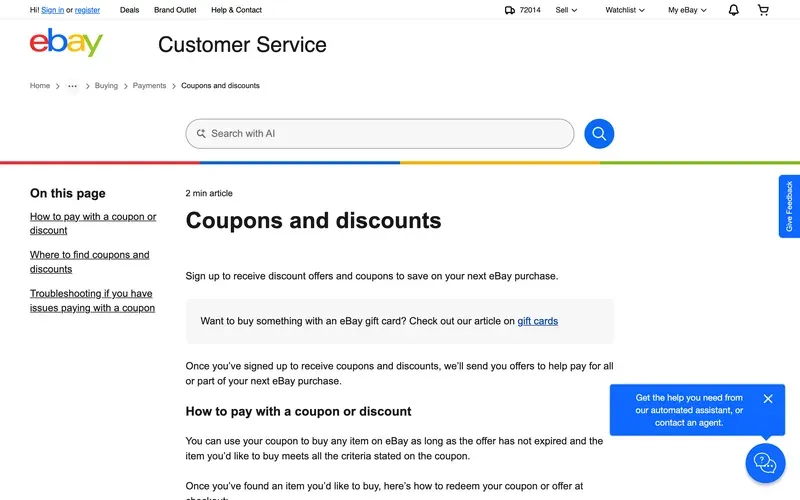
That’s why a “13% off everything” code doesn’t exist on eBay.
In other words, the 13% comes from stacking, and eBay’s own coupon is only one piece of it.
How to Save 13% on eBay Step by Step
Saving 13% on an eBay order takes six steps, in order, because some layers only count if you set them up before you pay.
Each step adds one layer, from the ones you set up once to the ones you check on each order.
Step 1: Sign Up for eBay’s Coupon Emails
eBay sends coupons only to members who opt in, so turn on marketing emails in your eBay communication preferences first.
Per the same help page, once you sign up, eBay sends offers that can pay for all or part of your next purchase.
You’ll get an email when a coupon is ready.

You can also find the code on eBay’s coupon page or in the Account section of My eBay.
Coupons can’t be moved between eBay accounts, so use the account you shop with.
If you want codes beyond eBay’s own emails, coupon sites and a browser coupon extension can show public ones.
Step 2: Start Every Order at a Cash Back Portal
A cash back portal pays you back part of your eBay order when you click its eBay link before you shop. Open the portal first, then eBay.
Rakuten shows eBay at up to 1% cash back as of November 2026.
Not every portal covers eBay, though, and rates change often.
BeFrugal’s eBay page said cash back was not available for eBay in November 2026, even though BeFrugal pays at many other stores.
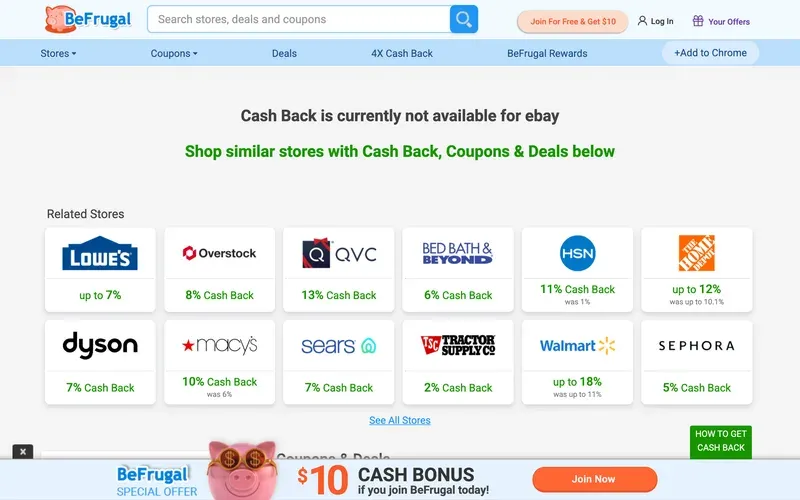
Here’s the deal:
Check the portal’s eBay page for the current rate and any excluded categories every time you shop.
Then stay in that same browser tab until you pay.
If you don’t have a favorite yet, this list of cash back portals compares the main ones.
Portals are just one kind of cash back app, and others pay you for scanning store receipts.
Step 3: Lower the Price Before You Buy
The item’s price is the biggest number in the order, so cutting it first does more than any other layer.
On a listing with a Make Offer button, you can offer the seller a lower price.
The seller can say yes, say no or send back a counteroffer.
Adding an item to your Watchlist shows the seller you’re interested, and some sellers send discount offers to watchers.
Also look for listings that take a share off when you buy more than one.
Why does that matter?
eBay counts a seller’s offer like a coupon, so compare the two and keep whichever saves you more.
Step 4: Apply Your One Coupon at Checkout
At checkout, enter the coupon code in the Add coupons section, or tick the box if the coupon already shows. Then select Apply to see the new total.
On Android, eBay’s mobile coupon page says you select redeem Coupon on the checkout screen, and no code is needed.
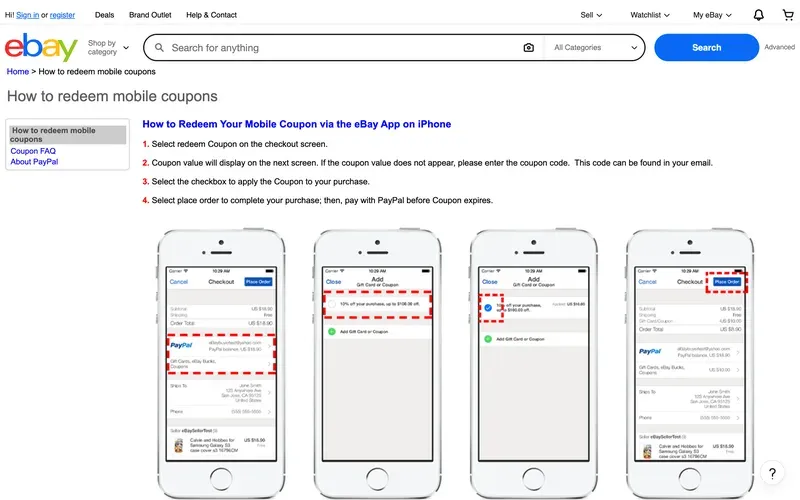
If a coupon fails, check the code, the date and the item rules first.
eBay also tells buyers to make sure they haven’t passed the coupon’s maximum number of redemptions.
Step 5: Pay With a Card That Pays You Back
Your payment method is the last layer, so pay with a credit card that earns cash back or points on every purchase.
That reward comes from the card company, not from eBay or the portal.
It works even on orders where you have no coupon.
The best part?
Card rewards and portal cash back come from two different companies, so they usually stack on the same order.
Read your portal’s eBay terms, though, since some portals limit which payment methods count.
You can also check whether eBay gift cards are selling below face value on gift card discount sites like Card Koala.
Those discounts change often, so only count one when you find it.
Step 6: Combine Shipping When You Buy More Than One Item
Shipping can cost more than your discount, so ask the seller to combine items when you buy several from one store.
An eBay Community mentor explains that sellers can combine separate Buy It Now items into one shipment. This works only if the buyer did not check out as a guest.
The seller can then refund the extra shipping after the package goes out.
Sign in before you buy, then message the seller and ask for one combined package.
What a 13% eBay Stack Looks Like
A 13% stack on eBay usually needs a coupon or seller discount near 10%, plus a few percent back from a portal and your card.
Here’s a made-up example to show the math.
Say you buy a $100 item and a coupon takes $10 off, so you pay $90.
Then assume your portal pays 1% and your card pays 2%, both on the $90 you paid.
That’s $0.90 from the portal and $1.80 from the card.
Your total saving is $12.70 on a $100 item, or about 13%.
What does that mean for you?
Without a coupon, the same order saves only $3, so the coupon or seller offer gives most of the saving.
In other words, the portal and card give you a small saving on every order, and the coupon turns it into a big one.
How eBay Multi-Buy Discounts Work for Buyers
An eBay multi-buy discount is a lower price a seller gives when you buy more than one item from them in one order.
The seller sets it up, so you can’t ask eBay for one.
You’ll see it on the listing as a note that you save when you buy more.
Add the extra items to your cart from that same seller and the lower price shows before you pay.
This works best for things you use up, like batteries, ink or cleaning supplies.
Then check your cart total against your coupon, since you may only get one of the two.
How to Get Cheaper Shipping on eBay as a Buyer
Cheaper eBay shipping comes from comparing the total price, buying from one seller and asking that seller to combine items.
A low item price with high shipping can cost more than a higher price with free shipping.
Always compare the full amount you’ll pay, not the price on the search page.
When a seller has more than one thing you need, group them.
Ask before you pay whether they can ship everything in one box, as Step 6 explains.
Why do some orders still cost so much to ship?
Each listing often carries its own shipping fee, so five small items can mean five fees unless the seller combines them.
Mistakes That Make a Layer Fail
Most eBay stacks fail because one layer doesn’t track, not because the discounts are too small.
These are the common ones:
- Leaving the portal tab: opening eBay in a new tab or app can lose the portal’s tracking.
- Using a coupon the portal excludes: some portals pay nothing when you use a code they don’t list, so read their eBay terms.
- Checking out as a guest: the seller can’t combine guest purchases into one shipment.
- Trying two coupons: eBay takes only one coupon or offer per purchase.
- Letting a coupon expire: eBay coupons work only for a limited time.
The catch? You have to repeat these checks on every order, since portal rates and coupons change often.
For more general tactics, these tips on stacking deals work at most stores, not just eBay.
Protect Your Savings With eBay’s Money Back Guarantee
The eBay Money Back Guarantee protects your savings by refunding eligible orders that never arrive or don’t match the listing.
eBay says the guarantee is automatic and covers your purchase price plus original shipping, with no extra fee.
Category and item exclusions apply, so check the listing before you buy.
If an item doesn’t arrive, contact the seller from your purchase history in My eBay first.
If it still isn’t fixed after three business days, eBay says you can ask it to step in.
A 13% stack only helps if the starting price is fair. Before you pay, compare prices on other sites and online flea markets.
For more ways to cut what you spend, see the full list of ways to save money.
Key Takeaways
- No magic code. eBay allows one coupon or offer per purchase, so 13% comes from stacking.
- Start at a portal. Open your cash back portal before eBay and stay in that tab until you pay.
- Cut the price first. Make Offer, Watchlist offers and multi-buy deals lower the biggest number.
- Pay with rewards. A cash back card adds savings even when you have no coupon.
- Sign in and combine. Guest checkout blocks combined shipping, which can cost more than the discount.
Frequently Asked Questions
Is there a way to always get a discount on eBay?
There is no discount eBay gives on every order, but you can get one on most orders by stacking layers. A cash back portal and card rewards work on almost any purchase, and a coupon or seller offer adds more when you have one.
Can you use more than one coupon on eBay?
No, eBay allows one coupon or offer per purchase. Pick the coupon that takes the most off your order, then add savings from outside eBay, like portal cash back.
How do I get eBay coupons sent to me?
eBay sends coupons to members who turn on marketing emails in their communication preferences. eBay then emails you when a coupon is ready, and you can also find it in the Account section of My eBay.
Can you get cash back on eBay purchases?
Yes, some cash back portals pay you a share of eligible eBay orders when you click through their eBay link before you buy. Rakuten listed eBay at up to 1% as of November 2026, but rates change and some portals pause eBay, so check each time.
Why am I paying so much for shipping on eBay?
Shipping is often charged per item, so several items from one seller can each carry a full shipping fee. Ask the seller to combine the items in one package before or after you pay.
How do I set up bulk savings on eBay as a buyer?
Buyers don’t set up bulk savings, sellers do. Look for listings that show a discount for buying more, then add the extra quantity or items from that same seller to one order.
Is it better to use Buy It Now or an auction on eBay?
Buy It Now is better when you want the item now at a known price, and it often lets you make an offer. An auction can end lower, but you have to wait and you may lose to a higher bid.
The Bottom Line
You can’t get 13% off every eBay order with one code, but stacking a coupon, portal cash back, a lower seller price and card rewards gets many orders close.
Before your next eBay order, turn on eBay’s coupon emails, pick one cash back portal and set it as your starting page.

Jason is a personal finance expert and the founder of Frugal For Less. He has spent over a decade researching and testing hundreds of money making apps, survey sites, and savings strategies to help readers earn more and keep more of their hard-earned cash.
More about the author